A VPS Gives You More Control, but It Asks More of You
A virtual private server sits between shared hosting and a full dedicated machine. You get your own slice of a physical server, with guaranteed resources and the freedom to install the software you choose. For many people, that extra control is exactly what they need once a basic shared plan starts to feel limiting.
GoDaddy offers VPS hosting alongside its other products, and it is a name many people already know from domains and shared hosting. This guide explains what a VPS is, who it suits, and what to check before you choose a GoDaddy VPS or any other provider.
What a VPS Actually Is
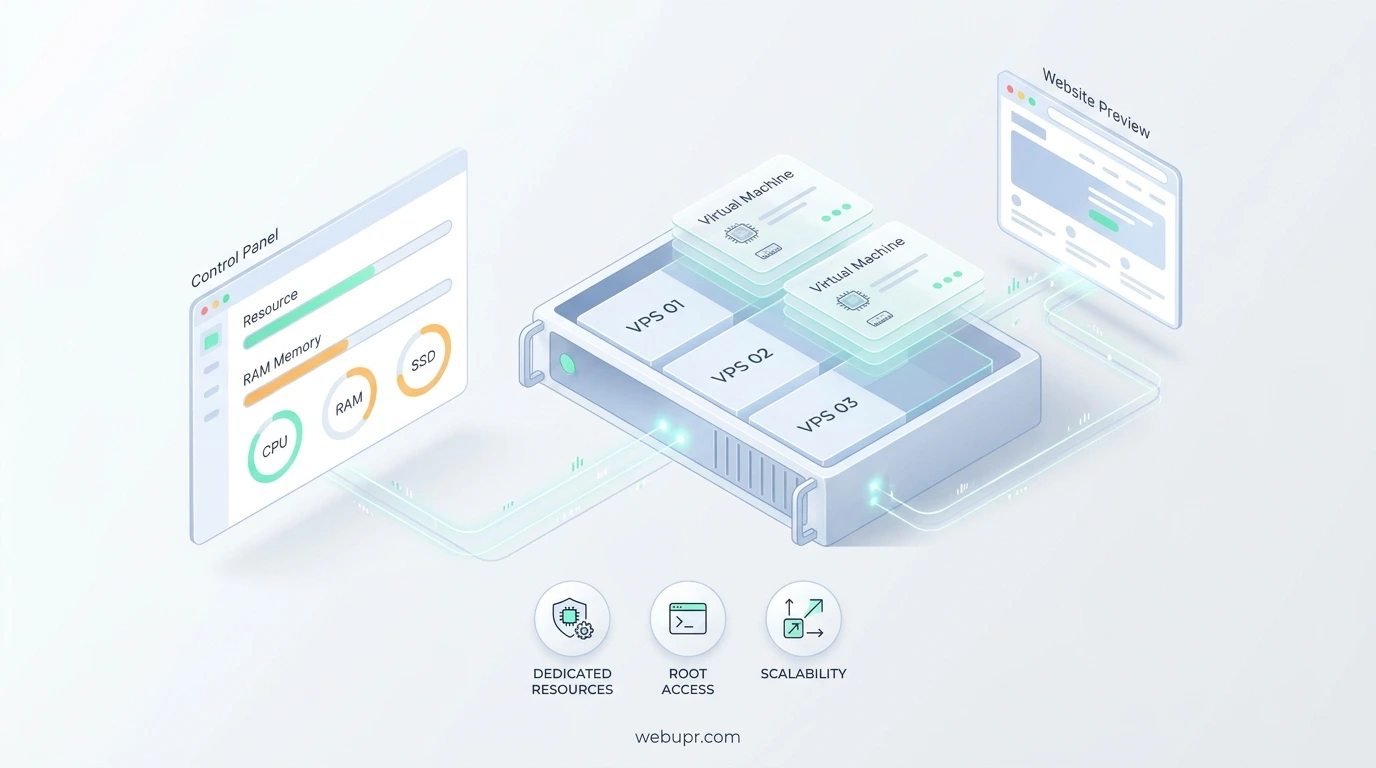
A VPS runs as a separate virtual machine on a shared physical server. The provider divides the hardware into isolated slices, and each slice gets its own operating system, memory, storage, and processor allocation. Your neighbours cannot use your resources, which usually means steadier performance than a crowded shared plan.
The trade-off is responsibility. On a basic shared plan, the provider handles most of the server work. On a VPS, you decide what is installed, how it is secured, and how it is kept updated, unless you choose a managed option.
Who a VPS Suits
A VPS suits people who have outgrown shared hosting and need specific software, custom configurations, or more predictable performance. Developers testing applications, agencies hosting several client sites, and businesses running custom tools often choose a VPS for that reason.
If your site is a simple brochure or a small blog, a VPS is probably more than you need. A shared plan will be cheaper and far less work. Our guide on best hosting for small websites helps you decide whether a simple plan is enough.
Managed or Unmanaged
Before you buy, check whether the plan is managed or unmanaged. A managed VPS includes the provider looking after updates, security patches, and basic maintenance. An unmanaged VPS gives you full access, and every task is yours.
If you are not comfortable with server administration, a managed option is usually worth the extra cost. Unmanaged plans suit people who enjoy the technical side and have the time to maintain the server properly.
Check the Resources You Actually Get
VPS plans are described by processor cores, memory, storage, and bandwidth. Look at the real allocation rather than the headline numbers. Ask whether storage is fast SSD, whether the processor allocation is guaranteed, and whether bandwidth is capped.
Plan for your busiest moment, not your average. A VPS that runs smoothly on a quiet day can slow down when traffic spikes, so leave room to grow.
Control Panel or Command Line
Some VPS plans include a control panel that makes common tasks easier, such as installing applications, managing backups, and creating email accounts. Others expect you to work from the command line. Decide which you prefer before you sign up, because switching later can be a hassle.
If you plan to run WordPress on a VPS, our guide on how to install WordPress on cPanel explains the easier route on a control panel based host, which is a useful comparison.
Security Is Your Responsibility on an Unmanaged Plan
A VPS exposed to the internet will be probed constantly. Keep the operating system updated, use strong passwords or key based login, close unused ports, and install a firewall. Restrict administrator access and remove software you no longer need.
Security problems on a VPS are rarely caused by the provider. They usually come from weak passwords, out of date software, or open ports that nobody remembered to close.
Backups and Snapshots
Check whether the plan includes backups or snapshots, how often they run, and how long they are kept. Test a restore before you need one. A VPS without a tested backup plan is a risk, however good the hardware looks on paper.
Support and Renewal Pricing
Find out what support covers on your plan. Some providers help with the platform but not with the software you install. Ask a pre-sales question to see how the team responds. Then check the renewal price, because VPS plans often cost more after the introductory period.
Compare Against Cloud Options
A VPS is not the only route to more power. Cloud platforms offer flexible scaling and usage based pricing, while a VPS gives you a fixed allocation that is easier to predict. Our article on shared hosting vs cloud hosting explains the trade-offs, and our guide to hosting in Google Cloud covers the cloud side in more depth.
Moving to a VPS
If you are moving a site from shared hosting, back up everything first, including the database and uploads. Set up the VPS, test the site on a temporary address, and check forms, email, and any integrations. Update your domain settings only when the new server works properly, and keep the old host running until you are sure.
A Simple Checklist
Decide whether you need a VPS or a simpler plan. Choose managed or unmanaged based on your skills. Check the real resource allocation and storage type. Confirm backups and practise a restore. Set up basic security before you go live. Check support options and the renewal price. Compare with a cloud option if you expect unpredictable traffic.
The Bottom Line
A GoDaddy VPS can give you more control, steadier performance, and room to run custom software, but it asks you to take on more responsibility. Choose a managed plan if you want less work, check the real resources and renewal price, and secure the server from day one. If that sounds like too much, a simpler plan may serve you better.
For current VPS plans and features, visit the official GoDaddy website. Plans and pricing change, so always confirm the details there before you buy.