
Your Portfolio Is Your Business Card. Do Not Let Hosting Ruin It
You have amazing work. Your designs are solid. Your photography is stunning. Your code is clean. Then someone clicks your portfolio link and it takes eight seconds to load.
They close the tab. Next candidate.
Portfolio hosting is different from regular website hosting. You are not running a blog. You are not selling products. You are showing off work that is supposed to impress people in seconds.
What Makes Portfolio Hosting Different
A portfolio is all about visual impact. Images, videos, animations. These load fast or they do not load at all.
Regular hosting can handle a text-heavy blog fine. A portfolio site with high-resolution images needs performance optimization built in.
You also need reliability. If your portfolio is down when someone tries to hire you, that is a lost opportunity. Downtime is expensive.
Speed Is Not A Nice-To-Have
Your portfolio loads in two seconds. Your competitor loads in five seconds. Your competitor loses the job.
Hiring managers and creative directors do not wait around. They want to see work fast. If images load slowly or the site feels sluggish, they assume your actual work is slow too.
This is unfair but real. Speed matters more for portfolios than almost any other site type.
Image Optimization Cannot Fix Bad Hosting
You can optimize images all you want. Compress them, convert to WebP, lazy load everything. But if your hosting is shared with a thousand other sites, none of that helps.
The host matters. Full stop.
What To Look For in Portfolio Hosting
Fast page load times: Under two seconds ideally. Test with Google PageSpeed Insights before signing up. Some hosts let you test with a free trial.
CDN included: Your images served from servers around the world. A visitor in Australia should not wait for images to travel from America.
Solid uptime: 99.9 percent minimum. Portfolio down means lost opportunities.
Easy to use: You should be able to update your portfolio without calling support. WordPress with a good portfolio theme is ideal.
Adequate storage: High-resolution images eat space fast. Make sure the plan gives you enough without forcing constant upgrades.
WordPress vs Portfolio Builders
WordPress hosting (like Pantheon or similar) gives you full control. You can use themes like Showit, Divi, or Elementor to build exactly what you want.
Portfolio builders like Squarespace, Wix, or Format handle everything. Easier setup, less flexibility.
For serious creatives, WordPress wins because you own your content and can export everything if you change hosts.
Budget Hosting Is The Wrong Choice Here
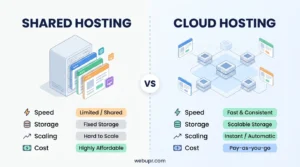
Cheap shared hosting (two to five quid a month) kills portfolios. Slow loading. Frequent downtime. Overselling.
Your portfolio deserves better. Budget for seven to fifteen quid a month minimum. That difference pays for itself in a single job you land because your portfolio loaded fast.
The Mobile Problem
Most people viewing your portfolio are on phones. Slow mobile connections plus bad hosting equals disaster.
Your hosting needs to be fast on mobile specifically. Test on 3G or slow 4G, not your home WiFi.
Storage Considerations
High-resolution photography or video samples eat storage fast. A single 4K video can be 500MB. A portfolio of photography might need 10GB.
Check your hosting plan limits. Some include 50GB of storage. Some include 500GB. This matters.
If you need massive storage, consider cloud hosting solutions that scale storage on demand.
Security Matters (But Not The Way You Think)
Your portfolio is not storing sensitive data usually. But if it gets hacked and starts showing malware warnings, clients assume your work is sketchy too.
SSL certificate (HTTPS) is mandatory. Every host includes this now. Make sure it is automatic and always current.
WordPress Specific Recommendations
If you are using WordPress, you want fast hosting. Pantheon is premium but worth it for portfolios. WP Engine is similar.
For cheaper WordPress options, Hostinger or Namecheap can work if you optimize your site properly.
Install a caching plugin (WP Super Cache or W3 Total Cache) and optimize images aggressively.
Portfolio Builders (Squarespace, Wix, Format)
These handle performance for you. You do not have to think about hosting speed because they optimize automatically.
Tradeoff: Less control. You are locked into their ecosystem. Exporting your portfolio later is harder.
For pure convenience, portfolio builders work. For long-term ownership of your content, WordPress wins.
Video Portfolio Hosting
If your portfolio includes video, hosting becomes critical. Self-hosting video is a nightmare.
Upload to Vimeo (professional, paid) or YouTube (free) and embed. Let them handle the video delivery. Your hosting just needs to load the embed fast.
Domain Name Matters
Your portfolio should be at yourname.com, not yourname.wordpress.com or some subdomain on a portfolio platform.
Most hosting includes a free domain first year. Some portfolio builders require you to pay extra for a custom domain. Factor that in.
Backup and Recovery
You spend months building the perfect portfolio. Your host server dies. You lose everything.
Make sure your host backs up daily and can restore if needed. Test the restore process before you need it.
Update Frequency
Your portfolio changes. New work goes in. Old projects come out. You need a host that does not make this painful.
WordPress with a good hosting solution lets you update in minutes. Portfolio builders vary.
Email Hosting
Your portfolio domain should have professional email: yourname at yourname.com, not yourname at gmail.com.
Some hosts include email. Some charge extra. Check before signing up.
Analytics and Tracking
You want to know who is viewing your portfolio. Which projects get the most attention. How long people spend on your site.
All major hosts let you add Google Analytics. Make sure this is included and easy to set up.
Support Quality
If your portfolio goes down and you need help at 3 AM, you need responsive support.
Premium hosting (Pantheon, WP Engine) has excellent support. Budget hosts have chatbots that are useless.
The Real Cost Calculation
Premium portfolio hosting costs twelve to fifteen quid a month. That is 144 to 180 quid a year.
One client project pays that back in days usually. If better hosting gets you one extra project a year, it paid for itself ten times over.
Do not cheap out on portfolio hosting.
What Kills Portfolios
Slow loading. Broken images. Design that does not work on mobile. Too much text (nobody reads portfolio copy). Outdated projects still showing.
Good hosting fixes the technical side. You fix the content side.
Where To Host Based on Your Situation
Budget conscious: Hostinger or Namecheap with WordPress and serious optimization.
Want hands-off: Squarespace or Wix. Pay slightly more, get simplicity.
Want best performance: Pantheon or WP Engine. Premium pricing, premium results.
Video heavy: Squarespace or Format. Video serving is handled properly.
Photographer: Format or Pixieset. Purpose-built for photo portfolios.
Final Reality Check
Your portfolio is your storefront. It is how you show your work to the world. Cheap hosting is a false economy here.
Spend the money on decent hosting. Your portfolio will load fast. It will stay up. You will look professional. And you will land more work.
That is worth every quid.